Account Product Intelligence
Your client says 'N18-4.' Do you know what that is?
Your clients use their own product codes — and they change with every merger and system migration. handify maps their codes to yours, tracks every lot shipped to every account, and keeps COAs one click away for Sales and Customer Service. No ERP login. No waiting on the lab.
Book a demo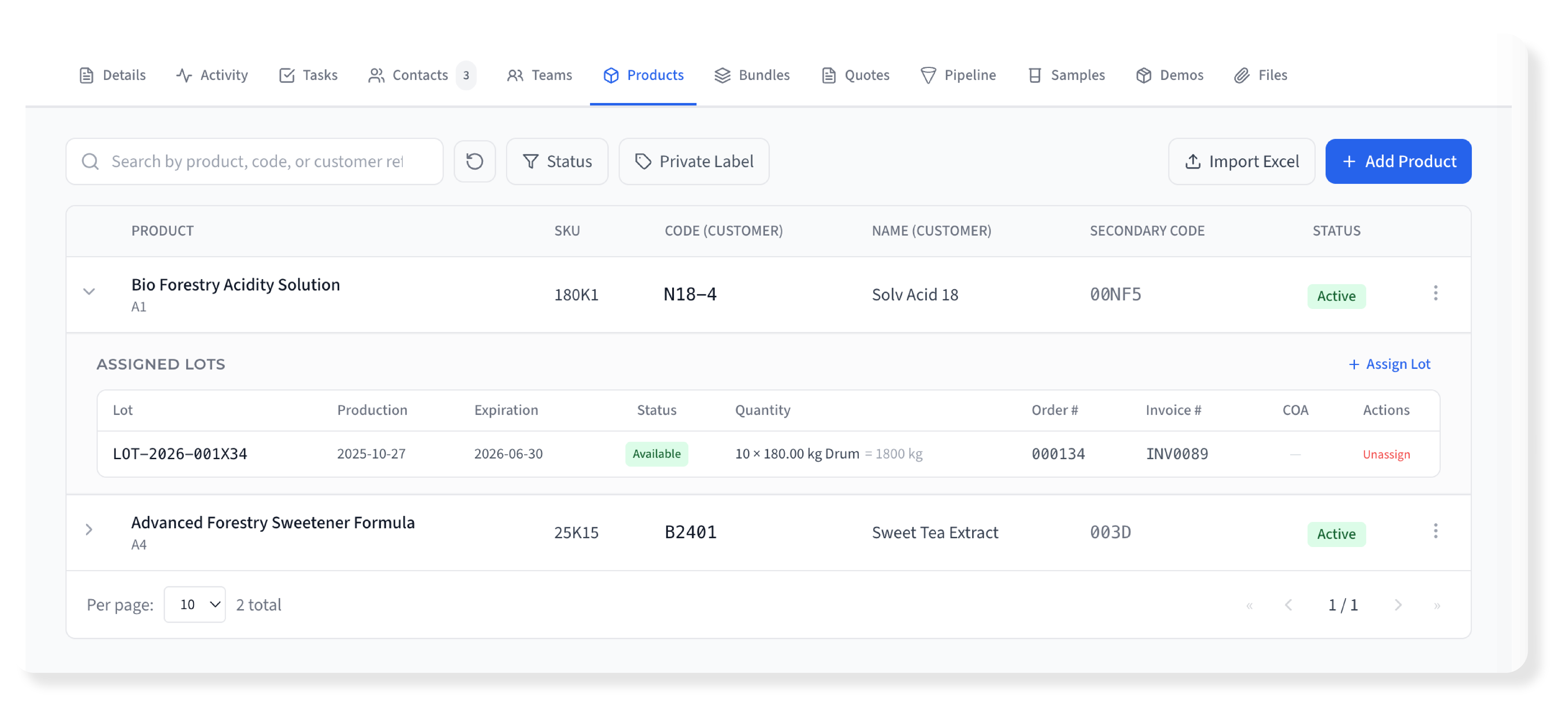
What happens when lot data lives outside Sales
When COAs, lot history, and customer codes are locked in the ERP or Quality's folders, your commercial team pays the price.
Your client asks for a COA by their product code — and your rep has to email Quality, wait for a response, then forward a PDF. That's not service, that's a relay race.
Clients have multiple product codes — from mergers, acquisitions, legacy systems, SAP migrations. Nobody in Sales knows which code maps to which product.
There's no single view of what lots have been shipped to a client, with which orders, or what COAs were delivered. The history is scattered across ERP, email, and spreadsheets.
When a client asks for documentation, the rep has to leave handify, log into the ERP or contact the lab, download files, and send them manually. Minutes wasted on every request.
COAs can't be included in the product bundles you share with clients — they live in a completely separate system.
How handify does it differently
Customer codes, lot history, and COAs — accessible to your sales team, inside every account.
Customer Reference Codes
Map your client's product codes to your catalog. Support primary codes, secondary codes (SAP, legacy, post-merger), and customer product names. When the client says 'N18-4,' your team finds it in seconds.
Account Lot History
Within each account, see every lot shipped per product — with order numbers, invoice numbers, quantities, ship dates, and COA status. The complete delivery history for every client.
One-Click COA Access
COAs are attached to lot records and accessible from the account view. When a client or auditor asks, your team finds it without leaving handify — no ERP, no lab, no email chain.
Bundle-Ready COAs
Include COA documents in Intelligent Bundles shared with your client. They access them from their portal alongside product information — always up to date.
Full Account Context
From the account view, your rep sees the complete picture: customer codes, products, lots, COAs, orders — all in one place. No switching between systems.
Product-Linked Lots
Every lot is linked to its product in your catalog. Navigate from product to available lots or from lot to product details — with status, quantities, and documents.
Expiration tracking
Track each lot's expiration date; lots are marked as expired automatically when the date passes.
Search & History
Find any lot by number, product, date, or customer code. Complete audit trail of every lot's lifecycle and every shipment to every account.
ERP-Only Lot Data vs. handify
Customer code → product mapping
Lot delivery history per account
Sales team COA access
COA sharing via client portal
Full account product context
Linked to product catalog
Expiration tracking
Search by customer code
Multiple customer codes per product
Audit trail & timestamps
Not a standalone tool. Connected to everything.
Lot and COA data connects to your product catalog, account views, and Bundles. Your sales team sees the full picture without switching systems.
“Your client asked for a COA five minutes ago. Are you still looking?”Book a demo
Frequently Asked Questions
Does this replace our ERP's lot management?
No. handify complements your ERP by making lot and COA data accessible to Sales and Customer Service. Your ERP handles manufacturing and inventory; handify puts that data in the commercial context where your team needs it.
Can we map multiple customer codes to the same product?
Yes. Each account-product relationship supports a primary customer code, a secondary code (for SAP, legacy systems, or post-merger codes), and a customer product name. Search works across all of them.
Can COA documents be shared with clients through Bundles?
Yes. COAs attached to lots can be included in Intelligent Bundles. Your client accesses them from their portal alongside product information — always current.
What does the sales rep see in the account view?
Products mapped with customer codes, lots shipped per product, order and invoice numbers, COA documents — all expandable and searchable from within the account. The complete commercial history.
Can we import lots from our ERP?
Currently, lots can be created directly in handify. ERP integration is available as a per-client project to automate the flow — since every company's ERP setup is different, this is handled as a tailored integration.
How does the customer code search work?
Your team can search by your internal product code, the customer's primary code, secondary code, or customer product name. The system cross-references everything instantly so you always know what product the client is asking about.
Is this suitable for regulatory audits?
handify maintains complete timestamps and audit trails for all lot records and shipments. While it's not a validated QMS, it provides structured, searchable data access that supports audit readiness for your commercial operations.
How does handify's lot tracking work for pharma ingredient and API companies?
Pharma ingredient and API companies manage lot-level traceability as a regulatory requirement — every delivery must be linked to a specific lot, with COA available for each batch. handify's Account Product Intelligence gives your sales and customer service teams instant access to lot history by account: which lots of each API were delivered, when, with which COA. Customer reference codes map your internal product codes to each pharma client's internal nomenclature. When a client requests a COA for a specific batch, your team finds it in seconds.
Can chemical companies use handify for customer code mapping and lot history?
Yes. Specialty chemical companies regularly deal with customers who use their own internal codes for your products — creating lookup friction whenever a customer asks about a delivery. handify's Account Product Intelligence maps each customer's internal codes to your product catalog, so your team can search by either code and immediately access delivery history, lot numbers, and COA documents for that account. When a customer calls asking for the COA for their product, your rep finds it instantly.
How does handify manage COA sharing for food ingredient companies?
Food ingredient customers regularly request Certificates of Analysis for delivered lots — for their own quality control, regulatory submissions, and customer requirements. handify connects COA documents to specific delivery lots by account, so your team can instantly find and share the right COA without digging through ERP systems or shared drives. COAs can be included in bundles and shared via Magic Link, ensuring clients always have access to the documents they need in a professional format, with expiration tracking for lot-specific certificates.
See Account Product Intelligence in action
Customer codes, lot history, COA access — inside every account, ready for your sales team.
Book a demo